Guide · Mac
Live wallpaper
on a Mac.
macOS moves its aerial wallpapers only while you lock or unlock your Mac. Then they stop, and your desktop holds a still frame. A wallpaper that keeps moving while you work takes an app, and Seasill is one: free to start, though not published quite yet.
The short answer.
macOS 26 Tahoe has no setting that keeps the desktop moving. Its aerials animate as you lock or unlock the Mac, and while they play as the screen saver; the rest of the time, the desktop shows a still frame.
- Built in: aerials, Dynamic Wallpapers that brighten and darken with the time of day, and your own photos. There is no option for a video of your own.
- With an app: motion all day, your own videos, a different wallpaper on each display, and wallpapers that change by themselves.
- With Seasill: a catalogue of more than 76,000 live wallpapers you can search by what you mean, and your own videos, which are never limited or marked, even on Free.
What macOS does on its own.
Open System Settings › Wallpaper and macOS offers Dynamic Wallpapers, your own photos, four families of aerials (Landscape, Cityscape, Underwater and Earth), pictures and colours. Dynamic Wallpapers “brighten and darken, based on the time of day”. You can add a photo, an image file, a folder or a Photos album. There is nothing for a video.
The aerials are the moving ones, and Apple is precise about when they move: they “animate as you lock or unlock your Mac”, and the one you choose doubles as your screen saver by default. When you unlock, the film slows to a stop and stays as a still frame on your desktop.
macOS 27 Golden Gate, out since 14 September 2026, adds aerials of the Golden Gate Bridge that behave the same way: motion as you unlock and as the screen saver.
Sources, checked on 28 September 2026: Apple, “Change your wallpaper on Mac” (macOS Tahoe 26); 9to5Mac on how aerials stop on unlock; 9to5Mac on the Golden Gate aerials.
What an app adds.
A live wallpaper app keeps a video playing behind your windows and icons, all day rather than for the few seconds around the lock screen. The good ones also give you:
- Your own videos. Something you filmed, a loop you made, a clip you have the right to use.
- A wallpaper per display. A calm one on the laptop, something wider on the external screen.
- Change without thinking about it. A playlist that moves from morning light to a city at night as the day goes.
- Somewhere to find them. A library of wallpapers made to loop, instead of hunting for files.
The cost is energy: decoding video takes more than showing a still picture. Look for an app that can stop when you cannot see the desktop anyway.
Setting it up with Seasill.
Seasill works through macOS’s own wallpaper system, the one the aerials use, so it appears in System Settings beside Apple’s wallpapers and on the lock screen as well as the desktop.
- Get Seasill.
It needs macOS 26 or later on Apple silicon. The first public build is not published yet: join the waitlist to hear the day it is.
- Choose Seasill once for each display.
In System Settings › Wallpaper, pick any Seasill wallpaper. That hands the display to Seasill; you only do it once. If you skip it, Seasill says so and tells you where to go.
- Set a wallpaper.
In your Library, right-click a wallpaper and choose Set as wallpaper, or select it and press Return. With more than one display, choose Set on every display or a display by name.
- Find something new.
Browse searches the catalogue by words or by what you mean (“rain on a window at night”), and any wallpaper has More like this. Download and set as wallpaper does both at once.
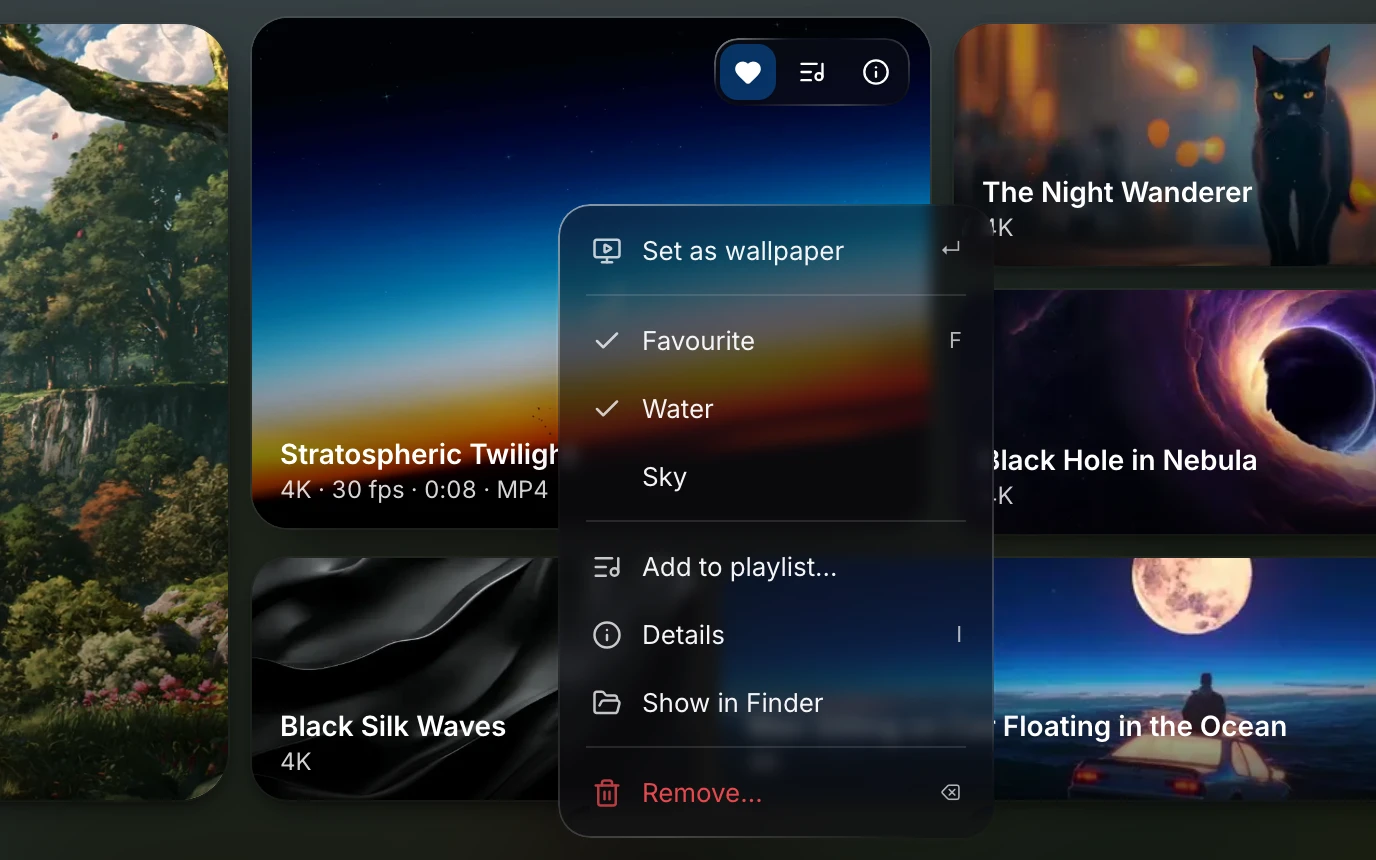
On the Free plan one display plays live and the others hold a still of their wallpaper; catalogue wallpapers play at up to 1080p with a small mark in a corner, and your library holds five of them at a time. Your own videos are never limited and never marked. Seasill and Seasill Pro lift the limits.
Other apps worth knowing.
We would rather you found the right app than ours. A few that people choose, with their own figures:
Phosphene Free · open source (MIT)
Plays any video on the desktop and the lock screen through the same wallpaper system, on macOS 26 or later. Seasill grew from Phosphene: its Mac wallpaper extension is Phosphene’s work, by kageroumado.
Checked on 28 September 2026: github.com/kageroumado/phospheneBackdrop $1.99 a month, $14.99 a year, or $29.99 once
Live wallpapers for the Mac from Cindori. Its free trial keeps up to three backdrops, with a watermark, for as long as you like.
Checked on 28 September 2026: cindori.com/store/backdrop and cindori.com/backdropWallper From $14.99 once · 7-day trial
4K video wallpapers for the desktop and the lock screen. Its site lists macOS 14.6 Sonoma through macOS 26.
Checked on 28 September 2026: wallper.appWhat you need for Seasill.
- Mac
- macOS 26 Tahoe or later, on Apple silicon.
- Your files
- mp4, mov and m4v play as they are; webm, mkv and avi are converted when you add them. Pictures, even GIFs, become wallpapers too.
- Free
- One computer and one live display. Catalogue wallpapers at up to 1080p, with a small mark, five in your library at a time. Your own videos, never limited.
- Seasill
- $29 a year for one computer, with everything full: every display live, full resolution, no mark, no limit on catalogue wallpapers.
- Seasill Pro
- $59 a year for three computers, in any mix of Mac and Windows. Both paid plans start with a 7-day free trial.
Questions.
Can a Mac have a live wallpaper without an app?
Not on the desktop itself. macOS aerials move as you lock or unlock the Mac and while they play as the screen saver; once you are working, the desktop shows a still frame. Motion all day takes a third-party app.
Is there a free live wallpaper app for Mac?
Yes. Phosphene is free and open source. Seasill has a Free plan too: your own videos are never limited, and catalogue wallpapers play at up to 1080p with a small mark in a corner, five at a time in your library.
Will Seasill put a watermark on my wallpaper?
Only on catalogue wallpapers, and only on the Free plan: a small Seasill mark in a corner. Your own videos never carry one, on any plan, and the paid plans have no mark at all.
Does a live wallpaper drain the battery?
Playing a video takes some energy, so a moving desktop uses more than a still one. Seasill can pause while windows cover the desktop (Settings › Playback › Pause when covered by windows), or play only on the lock screen.
Does Seasill work on an Intel Mac?
No. Seasill needs a Mac with Apple silicon and macOS 26 Tahoe or later.
Can Seasill play Wallpaper Engine wallpapers?
No. Seasill does not open Wallpaper Engine’s wallpapers or projects. It plays video: its own catalogue, and your own files. How the two compare.
Hear the day it’s out.
Seasill for the Mac is being signed for release. Leave your address and we will write when it is ready to download; nothing is added until you confirm.