Guide · Windows
Live wallpaper
on Windows.
Windows 11 has no moving wallpaper of its own: a picture, a solid colour, a slideshow or Windows spotlight. For motion you need an app. The best known are Wallpaper Engine ($4.99 on Steam) and Lively (free and open source). Seasill is a third, and it also runs on a Mac.
The short answer.
Windows 10 and 11 can’t play a moving wallpaper by themselves. Three apps do it well, and which is right depends mostly on whether you also use a Mac.
- Wallpaper Engine: $4.99 once, on Steam. Windows only, with a huge library made by its community on the Steam Workshop.
- Lively Wallpaper: free and open source. Windows only. Videos, GIFs, web pages and more.
- Seasill: Free to start, or $29 a year. Mac and Windows, with a catalogue of more than 76,000 wallpapers you can search by what you mean.
What Windows does on its own.
In Settings › Personalisation › Background, Windows offers four kinds of background: a picture, a solid colour, a slideshow of a folder, or Windows spotlight, a new photograph each day. None of them moves.
Microsoft has tried. Windows Vista Ultimate had DreamScene, and in September 2025 a video background was found in Windows 11 preview builds, hidden behind a switch. By January 2026 it had gone from newer builds without reaching the public release, and Microsoft’s help page still lists the same four kinds.
Sources, checked on 28 September 2026: Microsoft Support, “Change the desktop background in Windows”; Windows Latest, 22 September 2025; Windows Latest, 17 January 2026.
The three, side by side.
| Wallpaper Engine | Lively Wallpaper | Seasill | |
|---|---|---|---|
| Price | $4.99, once | Free | Free, or $29 a year; Pro $59 a year7-day free trial on both |
| Runs on | Windows 10 and 11, with a free Android companion app | Windows 10 (version 1809 or later) and 11 | Windows 10 (version 2004 or later) and 11, and macOS 26 or later |
| Where wallpapers come from | The Steam Workshop, where users share them (over a million, it says); its editor for your own | Your own files and pages, and a small built-in gallery | Seasill’s own catalogue of more than 76,000, searchable by meaning; and your own files |
| Kinds of wallpaper | 2D and 3D animation, websites, videos and some applications; some react to the mouse | Video and GIF, web pages, Unity and Godot apps | Video, from the catalogue and your files |
| Your own videos | Yes | Yes | Yes: never limited, never marked |
| Open source | No | Yes (GPL-3.0) | No |
Sources, checked on 28 September 2026: Wallpaper Engine on Steam; Lively Wallpaper on GitHub; rocksdanister.com/lively.
Choose Wallpaper Engine if
you only use Windows, you want the largest community library there is, or you want interactive and scene wallpapers and an editor to make your own. At $4.99 it is very good value.
Choose Lively if
you only use Windows and you want free and open source. It plays your videos and web pages beautifully, and costs nothing. Lively and Seasill, compared.
Choose Seasill if
you use a Mac as well as a PC, or share a home that has both (Seasill Pro covers three computers in any mix), or you would rather search a curated catalogue by what you mean than browse a workshop.
Either way
a moving desktop costs some energy and some of the graphics card. Whichever you pick, turn on its pause for full-screen games.
Setting it up with Seasill.
- Get Seasill.
For Windows 10 version 2004 or later, or Windows 11, on a 64-bit PC. The first public build isn’t published yet: join the waitlist to hear the day it is.
- Set a wallpaper.
In your Library, right-click a wallpaper and choose Set as wallpaper, or press Enter. Seasill draws it behind your desktop icons.
- Find more.
Browse searches the catalogue by words or by what you mean, and Download and set as wallpaper does both at once. Your own videos go in with Add › From your files… (Ctrl+O).
- Choose how several displays behave.
Settings › Displays › Several displays: the same wallpaper on each, a different one on each, or Across, one wallpaper spanning all of them.
- Put it on the lock screen too, if you like.
Settings › Lock screen › Play on the lock screen. Windows asks for permission once.
- Keep games smooth.
Settings › Playback has Pause for full-screen apps and games and Pause when covered by windows.
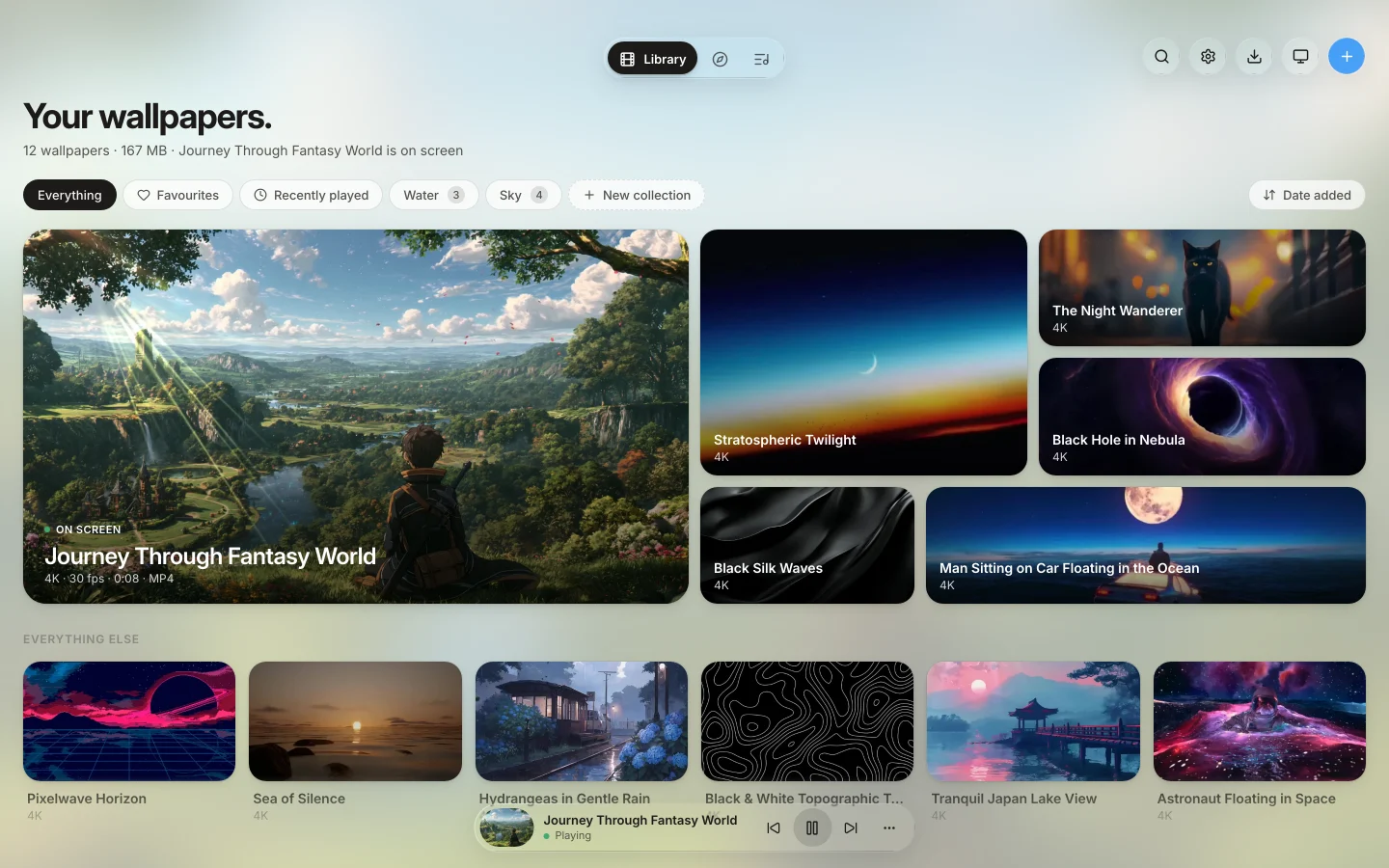
On the Free plan one display plays live and the others hold a still of their wallpaper; catalogue wallpapers play at up to 1080p with a small mark in a corner, five in your library at a time. Your own videos are never limited and never marked.
What you need for Seasill.
- PC
- Windows 10 version 2004 or later, or Windows 11, 64-bit.
- Your files
- mp4, mov, m4v, webm, mkv and avi.
- Free
- One computer and one live display; catalogue wallpapers at up to 1080p, with a small mark, five at a time. Your own videos, never limited.
- Seasill
- $29 a year for one computer, with every display live, full resolution and no mark.
- Seasill Pro
- $59 a year for three computers, in any mix of Windows and Mac. Both paid plans start with a 7-day free trial.
Questions.
Does Windows 11 have live wallpapers built in?
No. Microsoft’s own help page lists four kinds of desktop background: a picture, a solid colour, a slideshow and Windows spotlight. A video background was spotted in preview builds in September 2025, but it had not reached the public release when this page was checked.
Is there a free live wallpaper app for Windows?
Yes. Lively Wallpaper is free and open source, and it is very good. Seasill has a Free plan too: your own videos are never limited, and its limits apply only to catalogue wallpapers.
Will a live wallpaper slow down my games?
A moving wallpaper uses some of the graphics card while it plays. Seasill can pause for full-screen apps and games and while windows cover the desktop, and it can show a still image once it has been paused for a while, which frees the graphics card.
Can Seasill use Wallpaper Engine wallpapers?
No. Seasill does not open Wallpaper Engine’s wallpapers or projects; it plays video, from its own catalogue and from your files.
Does Seasill work on Windows 10?
Yes: Windows 10 version 2004 or later, and Windows 11, on a 64-bit PC.
Hear the day it’s out.
Seasill for Windows is on its way. Leave your address and we will write when it is ready to download; nothing is added until you confirm.